Knowledge Base Article
What happens if a merge tag cannot find data for a recipient?
If a merge tag cannot find the corresponding data for a particular recipient, the tag is replaced with an empty string (blank). No brackets, placeholder text, or error messages will appear in the sent email.
[FirstName] is the single exception. It never comes out blank: Argenta uses the recipient nickname when there is no first name, and the word Friend when there is neither. So Hi [FirstName], reads Hi Friend, at worst, never Hi ,.
Common scenarios where a tag resolves to blank:
- [TotalDonated] - The recipient has never made a donation
- [MembershipLevel] - The recipient is not a member
- [RenewalDate] - The recipient has no active membership
- [Nickname] - No nickname has been entered on their constituent record
- [MailingAddress] - No mailing address on file
- [Phone] - No phone number on file
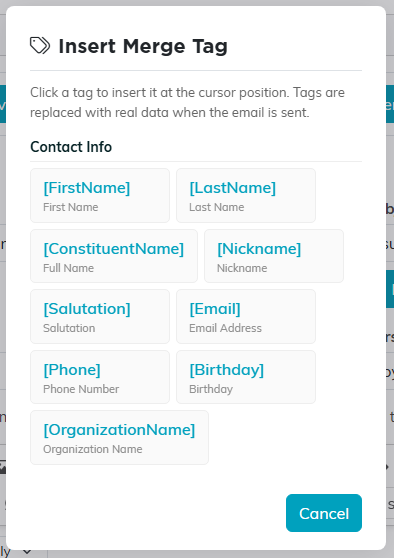
Every tag in the picker resolves to a blank when the recipient has no data for it, apart from [FirstName].
Best practices for handling missing data:
- Write your email so it still reads naturally if a tag is blank. "Dear [FirstName]," already handles this for you and needs no pairing; it is the other tags that need the care.
- Avoid sentences that depend entirely on a tag being present, such as "Your total giving of [TotalDonated] has made a difference" unless you know the recipients are donors.
- For donation or membership tags, only use those tags in emails being sent to lists that you know contain donors or members.
- Use the [OrganizationName] tag freely since it always has a value from your account settings.