Knowledge Base Article
Where Covered Processing Fees Land in Your Ledger
When a supporter ticks the box to cover the processing fee on one of your public forms, one card payment puts two separate amounts in your books. The fee they covered is money they gave you, so Argenta books it as income. The fee Stripe takes is money you paid out, so Argenta books it as an expense. The two are usually close in size, but they are recorded on different accounts and you will see both.
This applies to event tickets, campaign sales and donation forms.
What Argenta records for one payment
- The covered fee is income. It is added to the gift and credited to your organization's Donation account, together with the tax-deductible part of the payment. It is not a separate line: the covered fee and the tax-deductible amount arrive as one Donation credit.
- The ticket or item value is income on its own account. On an event ticket, the part that is not tax deductible is credited to your Event Ticket Sales account.
- Stripe's fee is an expense. Argenta creates an expense for the actual fee Stripe charged, paid to Stripe, and debits it to your Merchant Fees account. This uses the real fee, so it can differ from the amount the supporter covered by a few cents.
- The money waits in Undeposited Funds. The full payment is debited to Undeposited Funds, and the Stripe fee is taken back out of it, so what is left matches the deposit Stripe pays into your bank.
See it in the General Journal
- Open the gift's Donation Details and copy its Stripe Transaction ID.
- In the main menu, click General Financials, then General Journal.
- Paste the Stripe Transaction ID into the search box at the top. Every line from that one payment appears together.
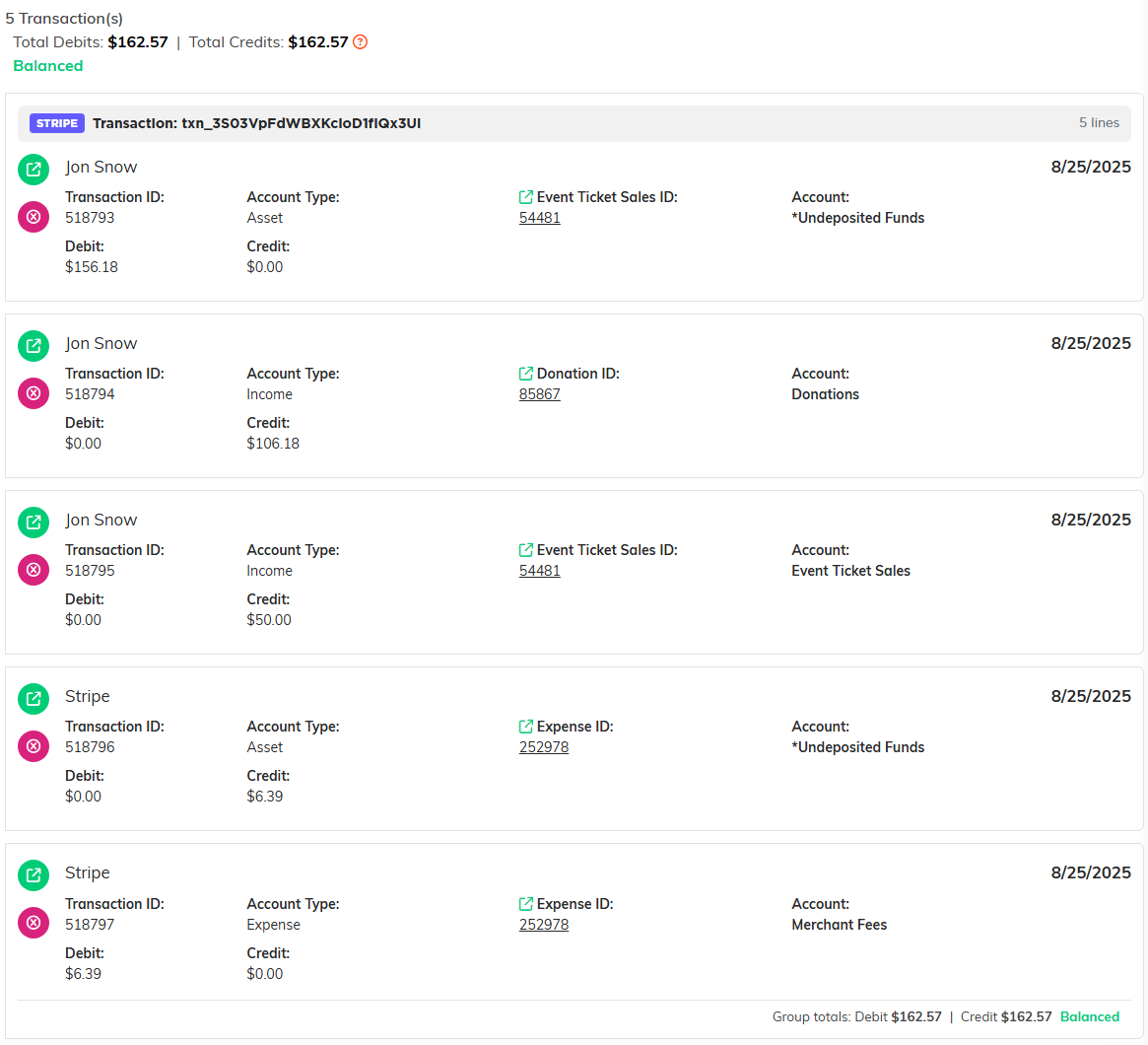
One $156.18 ticket purchase: $106.18 to Donations (a $100.00 gift plus the $6.18 covered fee), $50.00 to Event Ticket Sales, and Stripe's $6.39 fee to Merchant Fees.
The same purchase on the buyer's ticket list shows both fees side by side. Donated Fees is what the buyer covered and Merchant Fees is what Stripe charged. Net Revenue is the gross minus the merchant fee.

Donated Fees ($6.18) is income the buyer gave; Merchant Fees ($6.39) is the expense Stripe charged.
Why the covered fee shows up in Donations
A supporter who covers the fee is giving you that money, and it is part of what they are receipted for, so Argenta treats it as part of their gift. Stripe's fee is still recorded as an expense on its own line, so your books show both what came in and what went out.
Which accounts are used
The Donation account and the Merchant Fees account are set once for your whole organization, and you cannot change them in Argenta yourself. There is no separate account for covered fees: they go to the same Donation account as every other gift, so moving that account would move all of your donations with it. If your accountant wants covered fees treated differently, record a journal entry that moves the amount, or ask Argenta support through Help Center at the top right of any screen.
If no Merchant Fees account is set, Stripe fees are booked to *Unclassified Expense until one is.